# 陣列
當資料列表有很多筆的時候,例如下圖紅框:
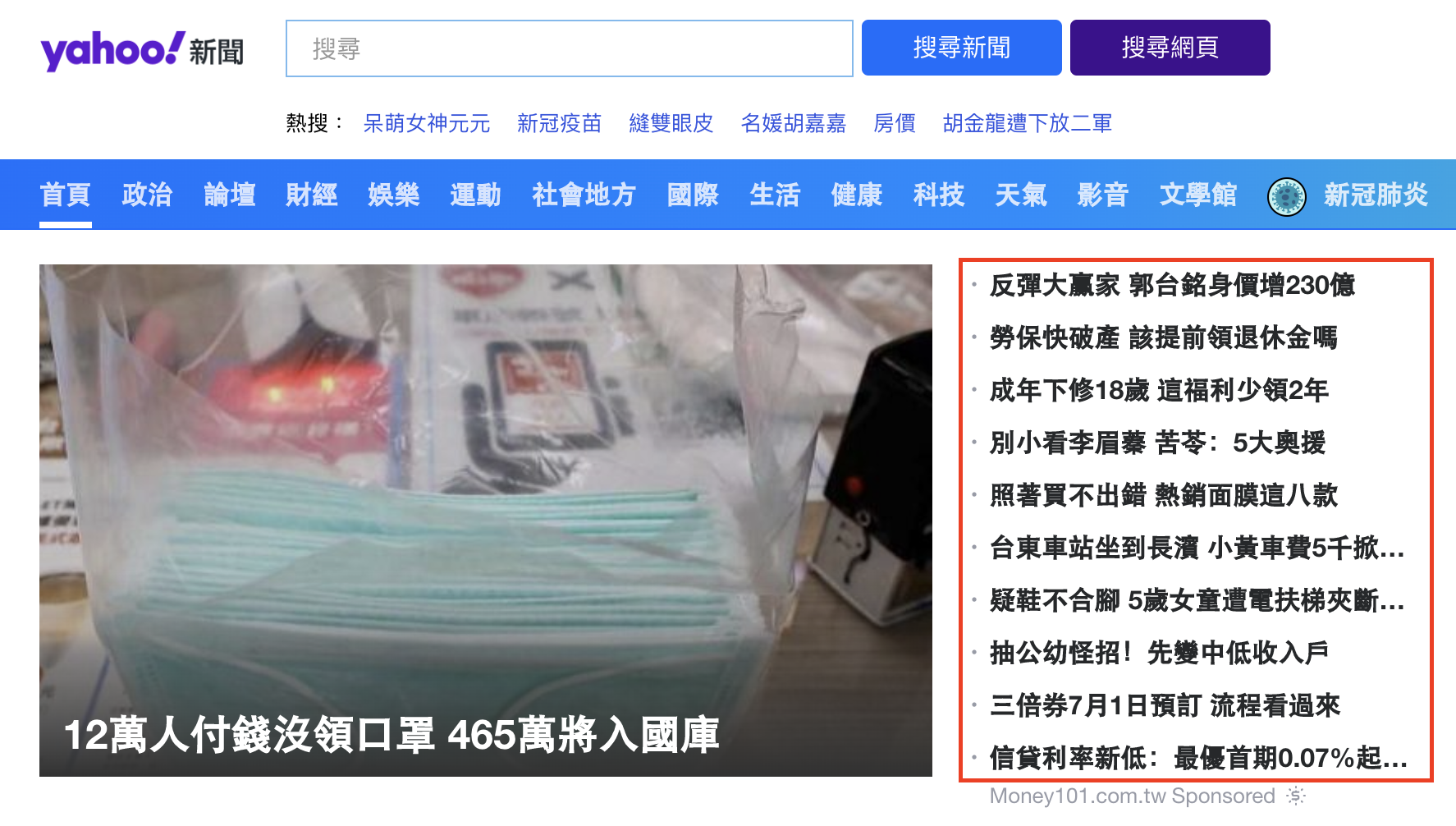
共 10 筆訊息,我們 js 難道就要宣告 10 筆資料嗎?如下:
var new1 = "反彈大贏家 郭台銘身價增230億";
var new2 = "勞保快破產 該提前領退休金嗎";
var new3 = "成年下修18歲 這福利少領2年";
// 略 ...
var new10 = "信貸利率新低:最優首期0.07%起►方案立即比較";
1
2
3
4
5
2
3
4
5
有幾筆資料就要宣告幾則嗎?這樣的感覺沒有很有效率
可以透過一個格式,像是 HTML 的 ul li 的 li 樣子,把它整理起來,讓 ul 整包帶走有沒有辦法?
有的,就是用陣列!
# 陣列常用語法
基本陣列寫法
var colors = ["紅色", "黃色", "綠色", "藍色", "黑色", "白色"];

console.log(colors); // 會顯示 陣列格式 ["紅色", "黃色", "綠色", "藍色", "黑色", "白色"];
1
2
3
2
3
每一筆之間用逗號隔開,所以上面範例有 6 筆資料
錯誤寫法
var colors = [紅色, 黃色, 綠色, 藍色, 黑色, 白色];
1
字串需要雙引號 " " 包住
陣列內容可放 字串、數字、物件、陣列、函式,例如:
// 內容是數字
var numberArr = [1, 2, 3, 4, 5];

// 內容是物件
var dataArr = [
  {
    name: "小王"
  },
  {
    name: "小明"
  },
  {
    name: "小菜"
  }
];

// 內容是陣列
var arrArr = [
  [1, 2],
  [2, 3],
  [3, 4]
];

// 內容是函式
function aFunc() {
  console.log("hello");
}

function bFunc() {
  console.log("hello");
}

var funcArr = [aFunc, bFunc];

// 也可直接把函式寫在陣列裡
var funcArr = [
  function aFunc() {
    console.log("hello");
  },
  function bFunc() {
    console.log("hello");
  }
];
1
2
3
4
5
6
7
8
9
10
11
12
13
14
15
16
17
18
19
20
21
22
23
24
25
26
27
28
29
30
31
32
33
34
35
36
37
38
39
40
41
42
43
2
3
4
5
6
7
8
9
10
11
12
13
14
15
16
17
18
19
20
21
22
23
24
25
26
27
28
29
30
31
32
33
34
35
36
37
38
39
40
41
42
43
# 如何抓取陣列內容呢?
以顏色為例:
var colors = ["紅色", "黃色", "綠色", "藍色", "黑色", "白色"];

console.log(colors[0]); // 顯示 紅色
console.log(colors[1]); // 顯示 黃色
console.log(colors[2]); // 顯示 綠色
console.log(colors[3]); // 顯示 藍色
console.log(colors[4]); // 顯示 黑色
console.log(colors[5]); // 顯示 白色
1
2
3
4
5
6
7
8
2
3
4
5
6
7
8
抓取陣列值,是從 0 開始算,不是從 1 開始算
# .push 新增陣列內容
陣列可以透過 .push 來新增資料,舉例如下:
// 宣告一個空陣列
var arr = [];

arr.push("黃色");

console.log(arr); // 顯示 ["黃色"]
1
2
3
4
5
6
2
3
4
5
6
# .length 計算陣列長度(有幾個內容)
當我們想要知道陣列的長度(幾個內容)的時候要怎麼得知呢?用 .length 可以得知陣列有幾個內容
var arr = [1, 2, 3, 4];

console.log(arr.length); // 顯示 4 (有 4 個內容)
1
2
3
2
3